
This skill setup boosted my combat power by 50%! A must-read for Raven 2 beginners.
Jun-11-2026 PSTAccessing Your Skills
To open the skill menu, tap or click the [Skills] button in the top-right corner of your screen. If you're playing on PC, you can also press the K key (default) as a shortcut. Once you have acquired some Crystals through gameplay, you can buy Raven 2 Crystal from the in-game shop or certain NPC vendors to unlock and upgrade additional skill slots, giving you more flexibility in customizing your Active, Passive, and Buff skills.
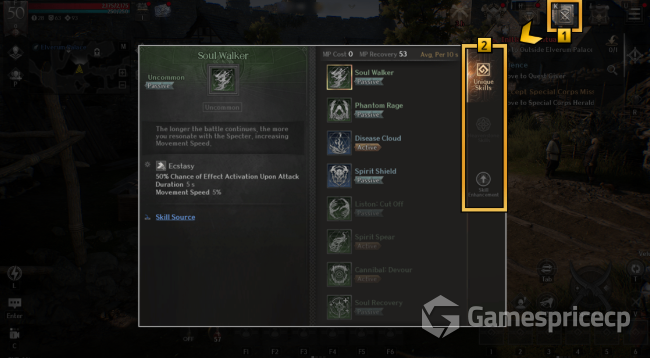
Understanding Skill Types
Skills are divided into three categories:
Active Skills – You trigger these manually during combat.
Passive Skills – These take effect immediately once you learn them, providing ongoing benefits without any input from you.
Buff Skills – Like Active skills, these are used manually and provide temporary enhancements.
Learning New Skills
Skills are learned by using Skill Books. You can obtain Skill Books through:
Purchasing from vendors
Crafting
Defeating field bosses
Completing dungeons
Various other in-game activities
To see where a specific skill can be obtained, tap or click the [Skill Source] button at the bottom of that skill's description.
Special Notes
Heavenstone Skills can only be acquired through the Heavenstone system – not from Skill Books.
Legendary Skills require a special consumable called Synerium to use. You can buy Synerium from any Miscellany Merchant NPC.
Viewing Different Skill Types
Inside the skill window, use the tabs on the right side to view:
Unique Skills
Heavenstone Skills
From here, you can also enhance your skills (see the Skill Enhancement section below).
Skill Registration & Usage
Registering to Quick Slots
Active and Buff skills can be registered to Quick Slots for easier access:
Select the skill you want to register
Tap or click on a Quick Slot on the left side of the screen to complete the registration
Setting Auto-Use
You have two ways to set a skill to activate automatically:
Tap or click the [Auto Use] button, or
Slide the registered skill downward from its Quick Slot
You can also manage Auto Use settings specifically for PvP by tapping the [Settings] button at the bottom.
Periodic Use Skills
Tap or click the [Periodic Use] button to register a skill for automatic activation at custom intervals. You can set exactly how often you want the skill to trigger.
Within Periodic Use settings, you have three PvP behavior options:
Maintain periodic use in PvP – The skill will still activate at your set interval even during PvP battles
Enable auto-use feature for PvP – The skill will activate automatically based on its cooldown timer in PvP
Do not use skills in PvP – The skill will never activate during PvP combat
Configuring Settings
Use the [Settings] button at the bottom of the skill window to:
Adjust the interval timing for Periodic Use skills
Fine-tune how your skills behave specifically in PvP scenarios
Skill Presets
You can save your Unique Skills and Heavenstone Skills – along with all their Quick Slot registrations – into one of three presets: A, B, or C. This allows you to quickly swap between different skill loadouts for different situations.
Heavenstone Skills Menu
Within the Heavenstone Skills menu, you can view skills assigned to three different tabs:
Una
Novem
Nulla
Note: Skills and Titan's Souls assignments within the Heavenstone tab are actually managed elsewhere. Go to Menu (☰) > Heavenstone to handle those configurations.
Skill Enhancement
How to Enhance
You can enhance skills by consuming Skill Enhancement Stones. The grade of the stone you need depends on the grade of the skill you're enhancing.
Important exception: Heavenstone Skills cannot be enhanced this way. They can only be enhanced through the Heavenstone system itself.
What Enhancement Does
Enhancing a skill improves its overall effectiveness – meaning stronger effects, higher damage, longer durations, or better cooldowns depending on the skill type. To speed up your enhancement progress, you can look for Raven 2 Crystal for sale from trusted sources, and for a reliable experience, I recommend MMOEXP, which offers competitive prices and fast delivery to help you gear up efficiently.